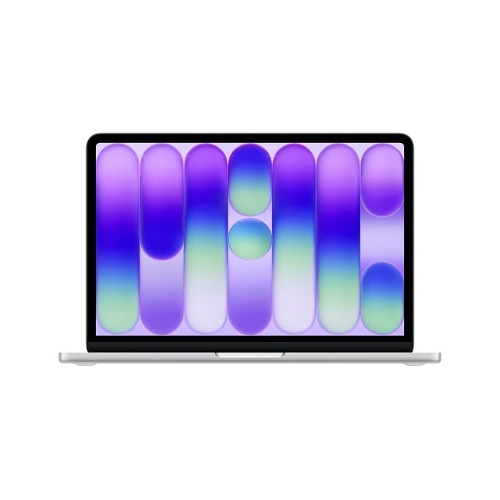
A Fresh Take on Entry‑Level MacBooks
Apple just dropped the MacBook Neo, a 13‑inch, aluminum‑clad laptop that packs the same A18 Pro silicon found in the iPhone 16 Pro. At an Australian launch price of $899 (or $1,099 for 512GB), it’s positioned as the best‑value Mac in its segment,ideal for students, remote workers and anyone who wants a premium feel without the flagship price tag.
Design & Colour Options
- Four bold finishes: Silver, Blush, Citrus, Indigo, each with a matching keyboard back‑panel.
- Aluminum chassis: Rigid, lightweight and built to survive the daily grind.
- Port layout: Two USB‑C ports (one 10 Gbps/DisplayPort, one USB 2.0), a headphone jack and a single USB‑A 2.0 port. No MagSafe, no Thunderbolt.
Core Specs at a Glance
| Spec | Detail |
|---|---|
| Chip | Apple A18 Pro (6‑core CPU, 5‑core GPU, 16‑core Neural Engine) |
| Memory | 8GB unified (non‑upgradeable) |
| Storage | 256GB / 512GB SSD |
| Display | 13.0‑in Liquid Retina, 2408 × 1506, 500 nits, P3 |
| Battery | 36.5Wh, up to 16h video playback |
| Camera | 1080p FaceTime HD |
| Audio | Dual speakers, dual‑mic array, Spatial Audio |
| Wireless | Wi‑Fi 6E, Bluetooth 6.0 |
| Extras | Magic Keyboard (no backlight), large trackpad, Touch ID on 512GB model |
Performance: A18 Pro in a Laptop
The A18 Pro’s 6‑core CPU and 5‑core GPU deliver smooth web browsing, video calls and document editing. Thanks to Apple’s unified memory architecture, even the base 8GB feels less cramped than comparable Windows laptops. Light video editing and AI‑assisted tasks run without a hitch, thanks to the 16‑core Neural Engine and on‑device Apple Intelligence.
Display & Audio: Small‑Screen, Big‑Impact
The 13‑inch Liquid Retina panel hits 500 nits, making it brighter than most budget Windows laptops. Colour accuracy is solid thanks to the P3 gamut and the 1080p FaceTime camera, paired with a dual‑mic array, makes virtual meetings feel more natural. Two side‑firing speakers with Spatial Audio round out the media experience.
The Trade‑offs
- Ports: One high‑speed USB‑C, one USB‑A 2.0 and a headphone jack. No Thunderbolt, no MagSafe.
- Keyboard: Magic Keyboard lacks backlighting, an odd omission for a modern laptop.
- Memory & Storage: Fixed 8GB RAM and a base 256GB SSD may feel limiting for power users.
Charging Realities: Faster With the Right Adapter
Apple ships the Neo with a 20W USB‑C Power Adapter (except in the UK/EU, where it ships charger‑less). Independent testing by ChargerLAB shows the Neo peaks at 18W with this charger. Swap in Apple’s 35W Dual USB‑C Port Compact Power Adapter (priced at $59) and the peak jumps to 30W, shaving roughly 20‑30 minutes off a full charge.
Higher‑wattage Apple adapters (96W, 140W) don’t push the Neo any faster, its charging circuitry caps out around 30W. Third‑party 30W+ chargers (e.g., Campad Electronics) can achieve similar speeds at a lower cost.
Value Verdict
For $899, the MacBook Neo delivers a premium aluminum build, a bright Liquid Retina screen and the efficiency of Apple silicon. It outperforms most Windows laptops in its price bracket, especially in battery life and AI integration. The lack of a backlit keyboard and limited ports keep the price low, but they’re the only real pain points.
If you can live with a single USB‑C data port and don’t need a backlit keyboard, the Neo is the most compelling entry‑level Mac you can buy in 2026, especially when paired with the modestly priced 35W charger for quicker top‑ups.
Bottom line: Apple’s best launch week ever brings a surprisingly capable, colourful and affordable Mac to the mass market. The Neo proves that you don’t need a $2,000 price tag to get a solid Mac experience.
MacBook Neo 2026 FAQs
How cheap is the Neo, really?
In Australia the MacBook Neo is priced at $899 for the 256GB model, $1,099 for 512GB. That’s cheaper than most Windows ultrabooks and still carries the Apple badge.
What colours can I actually pick?
Four bold finishes, Silver, Blush, Citrus, Indigo, each with a matching keyboard back‑panel. No more boring “space gray”.
Does the A18 Pro make a difference on a laptop?
Absolutely. Six‑core CPU, five‑core GPU, 16‑core Neural Engine. Web browsing feels instant, Light‑to‑moderate video edits run smoothly and on‑device AI tricks (e.g., live transcription) are buttery.
Is 8GB of RAM enough?
For the target audience, students, remote workers, casual creators, yes. The unified memory architecture makes the 8GB feel roomier than a comparable Windows laptop with the same amount.
Can I upgrade RAM or storage later?
No. Both are soldered. Choose your storage wisely at purchase.
How good is the display?
13‑inch Liquid Retina, 2408×1506, 500 nits, P3 gamut. Bright enough for cafés, colour‑accurate for photo work and still power‑friendly.
Battery life, Myth or Reality?
Up to 16 hours of video playback on a single charge. Real‑world mixed‑use (web, docs, video calls) usually lands around 12‑13 hours.
What about the camera and audio?
1080p FaceTime HD camera, dual‑mic array, side‑firing speakers with Spatial Audio. Video calls look decent, audio is surprisingly rich for a 13‑inch chassis.
Ports. What am I missing?
Two USB‑C (one 10Gbps/DisplayPort, one USB 2.0), a USB‑A 2.0 and a 3.5mm jack. No Thunderbolt, no MagSafe, no HDMI. Bring a dongle if you need more.
Keyboard, why isn’t it backlit?
Cost‑saving measure. The Magic Keyboard works, but you’ll have to rely on ambient light or an external lamp.
Charging speed. Can I make it faster?
Stock 20W charger tops out at ~18W. Swap to Apple’s 35 W Dual‑Port Compact Adapter (or any quality 30W+ USB‑C charger) and you’ll see ~30W, shaving 20‑30 minutes off a full charge. Higher‑wattage adapters (96W, 140W) won’t push it any harder.
Does the Neo support Apple Intelligence?
Yes. The 16‑core Neural Engine powers on‑device AI features like Live Text, Quick Note suggestions and background image upscaling without cloud lag.
Is Touch ID optional?
Only on the 512GB configuration. The 256GB model skips it to keep the price low.
How does it compare to the older MacBook Air?
Same screen size, brighter display, newer A18 Pro chip, but fewer ports and no backlit keyboard. Price is $100‑$200 lower, making it the better value for most entry‑level buyers.
Should I buy the 512 GB model?
If you need Touch ID, extra storage for media projects or just want the peace of mind of a larger SSD, go for it. Otherwise, 256GB is adequate for cloud‑first workflows.
Any hidden drawbacks?**
Fixed 8GB RAM, limited ports, no backlit keys and the charging ceiling at ~30W. All intentional trade‑offs to keep the $899 price point.
Bottom line?
A premium‑feel, colour‑rich and surprisingly capable Mac for under $1,000. Perfect if you can live without a backlit keyboard and a full‑speed Thunderbolt port.